

Updated: November 1, 2026
The internet is entering an era where seeing is no longer believing. AI-generated photographs can look remarkably realistic, synthetic voices can sound human, and AI-generated videos are becoming increasingly difficult to distinguish from genuine footage. So how can you check whether an image, video or audio clip was created or edited using AI?
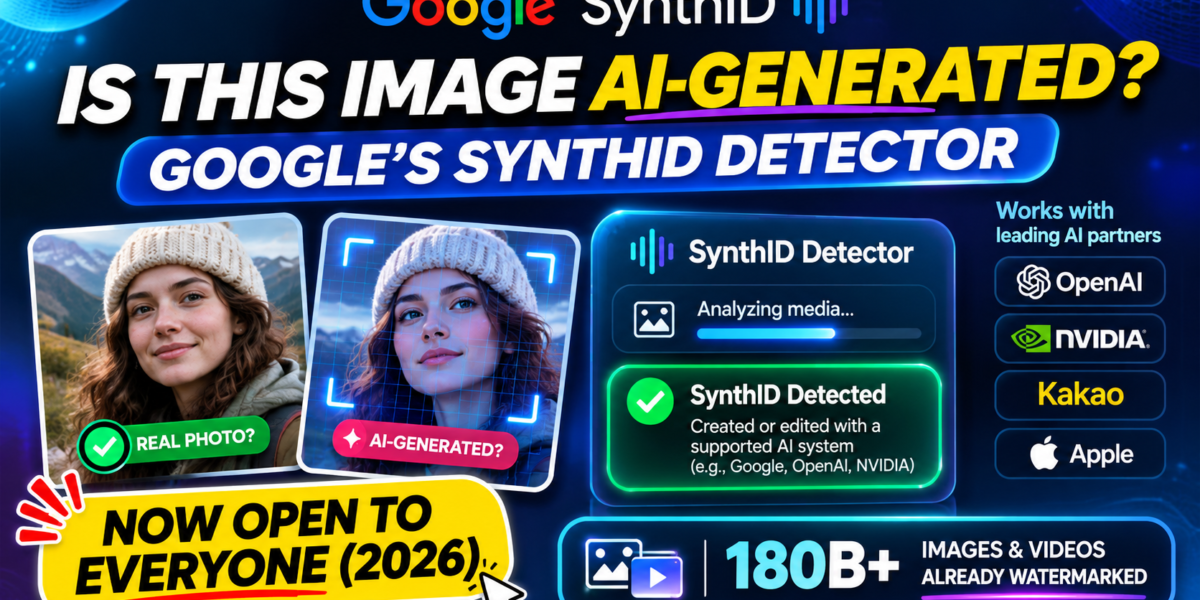
Google has opened its SynthID Detector to the public, giving people a way to check supported media for invisible AI watermarks. The portal became globally available in English on October 7, 2026. Google says the detector can check images, videos and audio for SynthID signals from Google and participating partners, including OpenAI, NVIDIA and Kakao. Apple was described as coming soon in Google’s announcement.
Google also reports that SynthID has been used to watermark more than 180 billion images and videos combined, as well as approximately 240,000 years of audio content. These are Google’s own cumulative figures.
But what does the detector actually prove? Can it identify ChatGPT images? And does a result saying “no watermark detected” mean a file is real? Here’s what you need to know.
What Is Google SynthID Detector?
Google SynthID Detector is an online tool that checks digital media for invisible watermarks embedded by compatible AI systems. Unlike a visible logo or text label, a SynthID watermark is designed to be imperceptible during normal viewing or listening.
Google introduced SynthID in 2023 as a way to mark AI-generated content. It later tested an early version of the detector with media professionals. The October 2026 expansion makes the verification portal available to the public worldwide in English.
Try it: Open the official SynthID Detector.
How Does SynthID Work?
Think of SynthID as an invisible identification signal added when supported AI systems generate or edit media. A compatible detector can later scan the file and look for that signal.
- Media is generated or edited: A compatible AI system creates or modifies an image, video or audio file.
- A watermark is embedded: The system adds an imperceptible signal to the media.
- The file is shared: It may be downloaded, uploaded or passed through common editing and sharing workflows.
- The detector scans it: SynthID checks whether a supported watermark is present.
- A result is shown: The portal reports whether it found a recognizable signal and, where supported, which AI ecosystem it is associated with.
The watermark is designed to remain detectable after certain common transformations. However, no watermarking approach is guaranteed to survive every possible edit or conversion.
Which AI Companies Support SynthID in 2026?
The important development is that the detector is not limited to Google’s own AI tools. Google’s October 7 announcement names OpenAI, NVIDIA and Kakao as partners, with Apple described as coming soon.
| Company | What Google announced |
|---|---|
| Supports its own SynthID-marked media across compatible AI products. | |
| OpenAI | Named as a SynthID partner. |
| NVIDIA | Named as a SynthID partner; NVIDIA has discussed watermarking content generated with Cosmos. |
| Kakao | Named as a SynthID partner. |
| Apple | Listed by Google as coming soon, not as a confirmed live partner in the announcement. |
Partner participation does not mean every file produced by every product from these companies will necessarily carry a detectable SynthID watermark. Coverage depends on the specific product, model and workflow.
180 Billion Images and Videos: Why This Number Matters
Google says more than 180 billion images and videos combined have been watermarked with SynthID since its launch, alongside approximately 240,000 years of audio content. These are company-reported totals, not independently audited counts.
The figures illustrate the scale at which AI-generated media is being produced and marked. Google also says its built-in verification features in Search, Gemini and Chrome handle more than one million requests daily. That figure refers to those integrated features collectively, not solely to visits to the standalone SynthID Detector website.
The larger issue is digital provenance: as synthetic media spreads, people need better ways to understand where content came from and whether it has been generated or edited using AI.
How to Check an Image, Video or Audio File with SynthID
- Open the official portal: Visit synthid.com.
- Sign in: Follow the sign-in instructions shown on the website. Access requirements and usage limits may change.
- Upload your media: Select the image, video or audio file you want to check.
- Review the result: The detector scans for supported SynthID watermarks and reports whether it finds a recognizable signal.
For the best chance of detection, use the original, highest-quality file available rather than a screenshot or heavily compressed copy. Ars Technica reported at launch that usage was limited to approximately 10 checks per user per day; check the portal for the current quota because limits can change.
What Do SynthID Detector Results Mean?
Result: SynthID detected
This means the detector found a recognizable watermark associated with a supported AI system. It is evidence that a compatible system was involved in generating or editing the media. It does not necessarily mean the entire file was created from scratch by AI: an authentic photograph that has been modified with a supported generative feature may also carry a watermark.
Result: SynthID not detected
This means the detector did not find a sufficiently recognizable supported watermark. It does not prove that the media is authentic or human-created.
Possible explanations include:
- The file was created with an AI model that does not use SynthID.
- The particular product or workflow did not embed a supported watermark.
- The original file was modified, compressed or converted in a way that weakened the signal.
- The watermark is present but cannot be reliably recognized in that file.
Remember: “Not detected” does not mean “not AI-generated.”
Can SynthID Detect Images Generated by ChatGPT?
Google names OpenAI as one of the partners whose supported media can be checked by the expanded detector. That means compatible OpenAI-generated media carrying the relevant SynthID signal may be recognized. It should not be interpreted as a promise that every ChatGPT image or every export will be detected.
OpenAI also provides information about provenance signals in its own products. Read its official explanation of provenance signals.
SynthID vs Traditional AI Image Detectors
There is an important difference between a watermark detector and an AI detector that estimates whether an image looks machine-generated.
| Feature | SynthID Detector | Typical AI image detector |
|---|---|---|
| Detection method | Looks for supported embedded watermark signals | Estimates AI origin from image characteristics |
| Needs a compatible watermark | Yes | Usually no |
| Identifies supported AI sources | Where supported | Often limited or uncertain |
| Can identify every AI image? | No | No |
| Can return an inconclusive result? | Yes | Yes |
SynthID does not simply judge whether an image looks artificial. It checks for a particular kind of embedded signal. That makes it useful for provenance, but it also means it cannot identify media from every AI generator.
SynthID vs C2PA: What’s the Difference?
You may also encounter C2PA Content Credentials, a standard for recording verifiable information about the origin and editing history of digital content.
The technologies are related but different:
- SynthID embeds an imperceptible watermark into supported media so a detector can look for it later.
- C2PA Content Credentials can attach signed provenance information describing a file’s origin and editing history.
Metadata-based credentials may be lost when files are stripped of metadata or captured as screenshots. Watermarks can also be weakened by some transformations. Using multiple provenance signals can provide more context than relying on one method alone.
Why SynthID Matters for Journalists, Creators and Businesses
1. Journalism and fact-checking
Journalists can use watermark checks as one part of their verification process when receiving images or videos claiming to show breaking events. A watermark result cannot independently prove that the event happened or that the media is presented in the right context.
2. Social media creators
Creators can check suspicious media before sharing it. This is useful when investigating viral clips, manipulated photographs and AI-generated promotional content.
3. Businesses and marketing teams
Marketing teams increasingly use generative AI for advertisements, product visuals and campaigns. Provenance checks can help document how supported assets were created or edited.
4. Education and research
Teachers, students and researchers can use tools like SynthID to discuss digital provenance, synthetic media and the limits of automated verification.
5. Online safety
As synthetic media becomes more convincing, a recognizable watermark can provide an additional clue before people trust or share a piece of content.
What SynthID Cannot Do
- It cannot identify every AI-generated image, video or audio file on the internet.
- It cannot prove that a file without a detected watermark was made by a human.
- It cannot establish whether the event shown in a photograph or video actually happened.
- It cannot identify the person who generated or uploaded a file.
- It may not distinguish a fully AI-generated image from a real photograph that was edited with generative AI.
For example, if a photograph claims to show a recent event, a SynthID result may provide evidence that a supported AI system was involved in creating or editing it. But it cannot establish whether the event happened, whether the image is correctly captioned or whether it has been taken out of context. Those questions still require independent verification.
Are We Moving Towards an Internet That Can Verify Itself?
For years, people often treated a convincing photograph or video as evidence that something had happened. Generative AI has challenged that assumption. Images can be created in seconds, videos can combine real and synthetic footage, and authentic photographs can be modified with AI tools.
Google’s public SynthID Detector is a useful step towards making content provenance more accessible. The expansion to partner ecosystems also points towards a future in which verification tools can recognize signals from more than one AI provider.
But wider adoption, interoperability and clear explanations of limitations will be essential. No single watermark or detector can solve misinformation on its own.
Our take: SynthID Detector is a practical AI verification tool, not a universal AI detector. Its biggest value is that it gives everyday users a simple way to check whether supported AI systems have left a recognizable watermark in digital media. It does not settle whether a piece of content is true, but it adds another useful signal to the verification process.
Frequently Asked Questions
1. Is Google SynthID Detector free?
Google has made the portal publicly accessible. Sign-in and usage limits may apply, and the current conditions are shown on the official website.
2. Can SynthID detect AI-generated images from ChatGPT?
It can recognize supported OpenAI media carrying a compatible SynthID watermark. Not every image or export should be assumed to contain one.
3. Does SynthID work with videos?
Yes. The public detector supports checking video files for supported SynthID watermarks.
4. Can SynthID detect AI-generated audio?
Yes. The portal can check supported audio files for SynthID signals.
5. Does a negative result mean an image is real?
No. It means the detector did not find a recognizable supported watermark. The media may still have been created or edited using another AI system.
6. Does SynthID detect AI-written text?
The public detector announcement covers images, videos and audio. Do not assume it can identify every AI-written paragraph or document.
7. Which companies are named as SynthID partners?
Google’s October 2026 announcement names OpenAI, NVIDIA and Kakao, alongside Google. Apple is described as coming soon.
8. Where can I access SynthID Detector?
Visit the official portal at https://synthid.com/.
9. Can SynthID watermarking be removed?
The watermark is designed to remain detectable after certain common transformations, but no watermark is completely robust. Extensive modification can weaken or remove a detectable signal.
10. Is SynthID the same as an AI detector?
No. A typical AI detector estimates whether content was generated artificially. SynthID checks for supported embedded watermark signals, making it a provenance tool rather than a universal detector.
Final Verdict
AI-generated media is becoming increasingly difficult to distinguish from authentic content. Google SynthID Detector offers a practical way to identify supported AI provenance signals across images, videos and audio.
It is not a perfect solution, but it is an important development for journalists, creators, businesses, researchers and everyday internet users.
The next time you see an unbelievable photograph online, don’t just ask whether it looks real. Ask whether its origin can be verified.
Official Sources and Further Reading
- Google DeepMind: SynthID Detector public launch and partner details
- Google SynthID Detector
- Ars Technica: SynthID Detector launch and usage limits
- TechCrunch: Google’s public AI media verification website
- OpenAI: Provenance signals in generated content
This article reflects announcements and documentation available as of November 1, 2026. Partner coverage, product capabilities and usage limits may change.