

In this article you will learn about more than fifty open-source solutions for running large language models (LLMs) locally on your PC or server. You will get a full breakdown of categories (runtimes, web UIs, model families, edge/mobile formats), plus hardware guidance (system RAM, SSD storage, GPU/VRAM). If you are setting up a local AI assistant, chatbot, or experimentation platform, this guide will help you choose the right tool and hardware.
Why run LLMs locally (and key hardware questions)
Running a large language model locally brings benefits: full data privacy, offline access, cost savings compared to cloud API usage, and control over the model and code. But it also raises questions: how much VRAM do I need? Can I use CPU only? What storage requirements exist?
We’ll answer those here and then map each opensource option to its hardware guidance.
Key hardware variables:
- System RAM: your computer’s main memory.
- SSD (storage): where model files reside and possibly offload storage.
- GPU / VRAM: for inference on graphics card, the GPU memory matters when using fp16 or fp32, or with quantized int8/int4.
- CPU-only mode: possible for small quantized models but slow for larger ones.
Before diving into the list, here are rough hardware tiers:
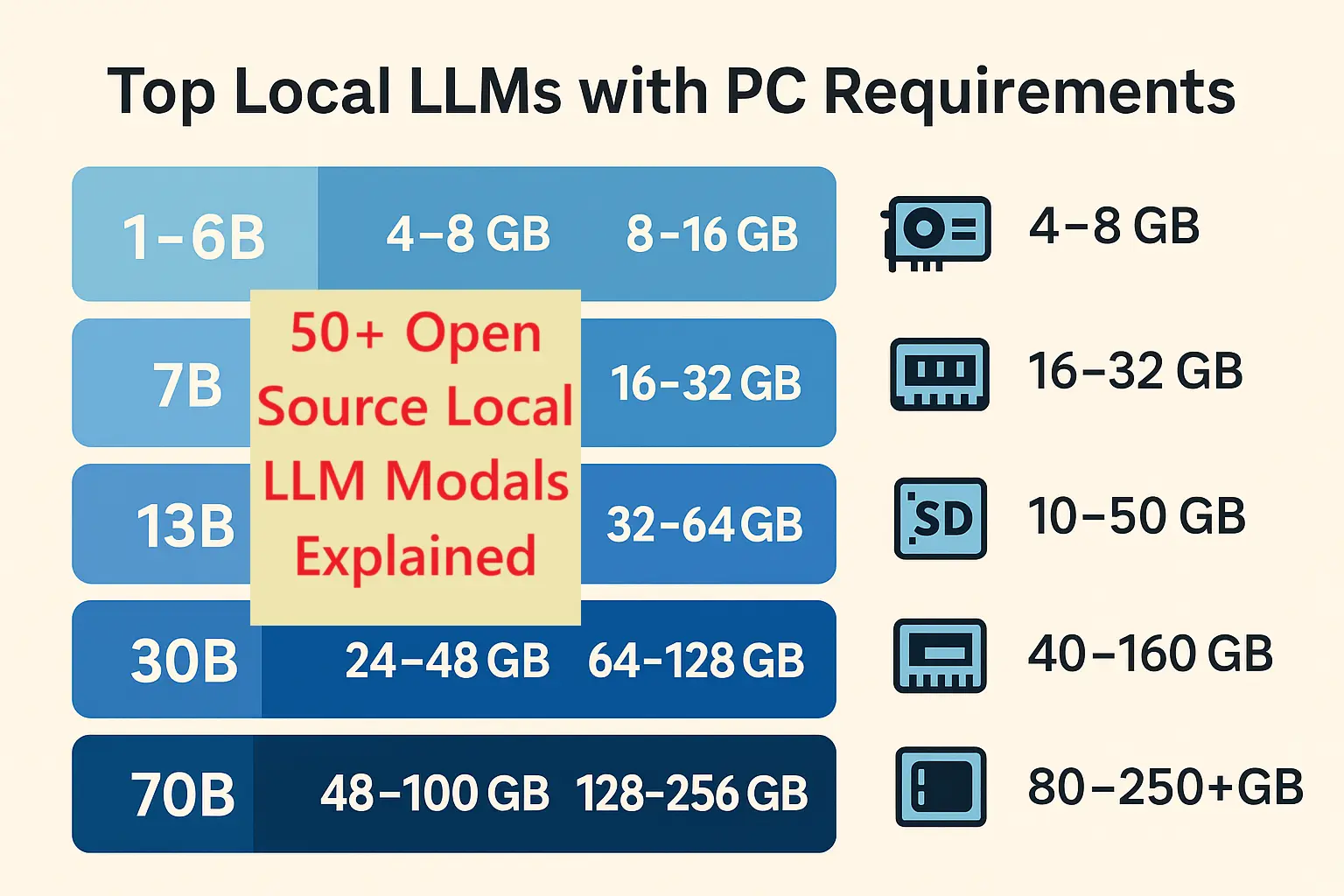
- Small models (1B–6B parameters) → maybe 4–8 GB VRAM, ~16 GB system RAM, ~30 GB SSD.
- Mid models (7B–13B) → ~12–24 GB VRAM, 32–64 GB RAM, ~50–100 GB SSD.
- Large models (30B–70B+) → 48–100+ GB VRAM, 128+ GB RAM, maybe 200+ GB SSD.
Quantization and optimized runtimes can reduce these by 2–8× in many cases.
Let’s now explore the categories and list the tools.
Category A: Lightweight CPU / embedded runtimes and libraries
These are best when you do not have a massive GPU or you want to run on laptop / embedded.
Open-source options include:
A minimalist runtime for running large language models in GGML / GGUF format on CPU or with minimal GPU. It enables models to run on lower VRAM or even purely CPU with quantization.
Hardware guidance: For a 7B model quantized to int4/int8 you might run on 8–16 GB system RAM plus ~20–30 GB SSD for model file. GPU is optional; VRAM requirement minimal if using CPU mode.
2. GGML / GGUF tooling (model format & quantization)
These formats and conversion tools enable optimized storage and inference of models in low-float or integer formats.
Hardware: Same as above; quantized files drastically reduce VRAM and RAM requirements.
3. GPT4All (Nomic) – packaged local models and easy interface
Designed for local use out of the box; supports CPU or GPU.
Hardware: Minimum ~8 GB system RAM; SSD space depends on model (≈10–30 GB). GPU optional for better speed.
1. llama.cpp (ggml) – C/C++ inference for many LLaMA-style models
4. llama.c (Windows or ports) – ultra light ports
Ports for lower-power machines or laptops.
Hardware: Suitable for small quantized models on laptops with 8–16 GB RAM. GPU may be integrated iGPU.
5. GGML bindings (Python / JavaScript) – runtime bindings
These libraries help run GGML models in languages like Python or JS.
Hardware: Follows ggml requirements; very useful for embedding models in applications without heavy hardware.
Category B: Local servers / web UIs and orchestration
These provide user-friendly interfaces or local servers to make it easier to run models and interact with them.
6. text-generation-webui (oobabooga)
A popular web UI frontend supporting many backends (PyTorch, bitsandbytes, ggml).
Hardware: For 7B models you may need ~8–14 GB GPU VRAM; for 13B models you’ll get comfort with ~24 GB VRAM. System RAM around 32 GB recommended.
7. LocalAI – fast local server with automatic backend detection
Fits use-cases where you want a REST API locally.
Hardware: GPU recommended for interactive speed; 12-24 GB VRAM sweet spot for mid sized models.
8. Ollama – model management + runner
Simplifies installation and switching models; supports GPU acceleration.
Hardware: Discrete GPU preferred; integrated GPU may limit model size or speed.
9. LM Studio – desktop GUI for local LLMs
Supports Vulkan offload for laptops/mini-PCs.
Hardware: Works even on machines with integrated GPU; for decent performance a discrete 12GB+ GPU is recommended.
10. KoboldAI – storytelling UI + multiple backends
Ideal if you want creative applications.
Hardware: Varies by backend; for modern models plan for ~12 GB VRAM or more.
11. LocalAGI – agentic stack for local models
Focuses on building agents locally rather than just chat.
Hardware: Depending on complexity; GPU recommended for mid/large models.
You might also like our blog post on Ai War Between Google, Deepseek and Chatpgt.
Category C: Low-level acceleration & quantization tools
These tools help you get more out of your hardware by reducing memory, boosting speed, or enabling larger models on smaller systems.
12. bitsandbytes – 8-bit optimizers & loaders
Allows you to load models in 8-bit (int8) to reduce GPU memory usage by about half compared to fp16.
Hardware: With int8 you can run 13B models on 12-24 GB VRAM cards depending on other factors.
13. AutoGPTQ – automatic quantization for faster inference and lower VRAM
Focuses on converting models to int4/int8 with minimal loss of quality.
Hardware: After quantization, models that previously needed 24+ GB VRAM might run on 12-16 GB VRAM at reduced performance cost.
14. ExLlama – fast CUDA inference kernels for LLaMA derivatives
Optimized for NVIDIA GPUs; improves throughput and efficiency for large models.
Hardware: Best with Nvidia cards; helps when using 24-48 GB VRAM for 30B models.
15. GGUF/GGML quantizers (TheBloke tools)
Community tools to convert many popular model checkpoints to optimized GGUF format for minimal hardware.
Hardware: Makes many large models viable on 12-24 GB VRAM systems when quantized properly.
Category D: Hugging Face / PyTorch / Transformers ecosystem
The “standard” deep-learning framework approach to local inference or training.
16. Hugging Face Transformers
Large ecosystem supporting many models, fine-tuning, inference.
Hardware: Running models in fp16 or fp32 often needs higher VRAM than optimized runtimes. For example a 13B model may need 24–30+ GB VRAM.
17. Text Generation Inference (TGI) – Hugging Face
Designed for high-performance inference servers for large models.
Hardware: Multi-GPU or high-VRAM setups are typical; good for production rather than hobby.
18. Accelerate – Hugging Face
Allows multi-GPU, offload, distributed inference.
Hardware: If you have two or more GPUs or GPU+CPU offload, you can run 30B+ models locally.
Category E: Major open-source model families (to run locally)
These are individual model checkpoint families you can download and run locally. I’ll group by size class to make hardware guidance easier.
Small / portable (1B–6B)
- GPT-J (6B) – easier to run; ~12 GB VRAM in fp16; smaller with quantization.
- Pythia small sizes – 1–6B models suitable for desktops.
- Alpaca / Alpaca-style fine-tuned models (7B) – hardware similar to 7B class below.
Mid class (7B–13B)
- Mistral-7B – efficient 7B model; ~12–16 GB VRAM in fp16.
- Llama-2 / Llama-3 (7B) – runs well on 12-16 GB VRAM with quantization.
- Vicuna-7B / Vicuna-13B – instruction-tuned; expect ~16–24 GB VRAM for 13B in fp16.
- MPT-7B / MPT-13B – runs comfortably on 16-24 GB VRAM.
- Baichuan-7B – similar profile.
- Mixtral-7B / 13B – high-performance; 13B version likely ~24+ GB VRAM.
- CodeLlama-7B – code-specialized; VRAM similar to text-models of same size.
Large class (30B–70B+)
- Falcon-40B – requires ~48–100+ GB VRAM in fp16; but quantization and sharding let you run on smaller setups (with trade-offs).
- Llama-2-70B – very heavy; multi-GPU or offload required.
- GPT-NeoX-20B+ – 20B model requires ~40+ GB VRAM.
- RedPajama-30B – similar scale.
- BLOOM-176B – server-class.
- OPT-175B – very large; not practical for most local setups.
- Gemma family large sizes – scale accordingly.
- TheBloke GGUF quantized versions of large models – make them feasible on smaller hardware via quantization.
- RWKV large versions – memory efficient but still large.
- Dolphin (Databricks Dolly large) / Orca large versions – heavy hardware needed.
- Koala large sizes – similar.
- Qwen / Other Chinese large language model families – hardware scale matches size.
Category F: Edge / Mobile formats and toolchains
These allow inference on laptops, small PCs, or mobile/embedded devices.
- CoreML / Apple Metal runtimes – for Macs with M1/M2. A 7B model may run with 16–32 GB unified memory.
- ONNX Runtime with quantization – convert models to ONNX and run on CPU or other accelerators.
- Apache TVM – compile models for embedded inference.
- (bonus) WebAssembly / browser-based quant models – some very small models run fully in browser.
Category G: Full-stack servers, containers, and orchestration
For enterprise or heavy local deployment.
- Docker images for Text Generation Inference – containerised production setups.
- KServe / KFServing – Kubernetes-based serving for LLMs.
- Ray + Serve – distributed inference orchestration.
- NVIDIA Triton Inference Server – multi-GPU high-performance serving.
- Multi-node GPU clusters – running large models across nodes.
Category H: Research and experimental runtimes / novelty
- RWKV.cpp – CPU-friendly implementation of RWKV architecture; runs smaller versions on modest hardware.
- FlashAttention variants / fused kernels – for high throughput but still hardware demanding.
- Community forks of ggml/llama.cpp targeting extreme quantization and small GPUs.
- Experimental browser-based local LLM runtimes (edge WebGPU) – still early but promising.
How to choose your hardware for local LLMs
You’ll need to decide: what model size will you use, what budget/PC do you have, how fast must inference be? Use this process:
- Decide model size (7B vs 13B vs 30B).
- Check VRAM budget: Do you have 12 GB card, 24 GB, or more?
- Pick runtime: If you use optimized runtime/quantization you may cut VRAM—so a 12 GB GPU may support a 13B model if quantized.
- Check system RAM and SSD: For a 13B model, plan 32–64 GB RAM and 50–100 GB SSD.
- Consider future growth: If you may want to run 30B later, buy a 24 GB or 40+ GB GPU or a dual-GPU rig.
Here are budget tiers:
- Entry hobbyist build: 32 GB system RAM, 1 TB NVMe SSD, GPU ~12 GB VRAM. Good for 7B models or small 13B quantized.
- Power user build: 64 GB RAM, 2 TB SSD, GPU ~24 GB VRAM (e.g., 3090/4080). Can run many 13B models comfortably and some quantised 30B.
- Server/enthusiast build: 128 GB+ RAM, multi-TB NVMe, GPU(s) 40+ GB VRAM each or dual/tri GPU. For 30B–70B class.
Hardware requirement details by model-size category
Here is an expanded table with more details and explanation for each model size category. Use it as a planning reference.
| Model size | Typical VRAM (fp16) | System RAM | SSD storage | Real-world comments |
|---|---|---|---|---|
| 1–6B | ≈ 4–8 GB | 8–16 GB | 10–30 GB | Many laptop GPUs or CPU only. Good for prototypes. |
| 7B | ≈ 6–16 GB | 16–32 GB | 10–50 GB | The “sweet spot” for consumer hardware. 12 GB GPU often works with quantization. |
| 13B | ≈ 12–30 GB | 32–64 GB | 20–80 GB | Requires a higher-end consumer GPU (24 GB) or offload strategy for smaller VRAM. |
| 30B | ≈ 24–48+ GB | 64–128 GB | 40-160 GB | Multi-GPU or GPU+CPU offload required. Quantization helps. |
| 40B | ≈ 48-100+ GB | 128+ GB | 80–250 GB | High end workstation or server required for non-quantized. |
| 70B+ | ≈ 100-250+ GB | 256+ GB | 200+ GB | This is enterprise/cluster territory unless heavily quantized and sharded. |
Note: Quantization (int8, int4) can reduce the VRAM needs significantly—sometimes by half or more. If you use a runtime that supports quantization and efficient memory offload, you can stretch smaller hardware further.
Best workflow for getting started with local LLMs
- Begin with a 7B model and a friendly UI (e.g., text-generation-webui or LM Studio).
- Use a GPU of at least 12 GB VRAM, 32 GB system RAM, 1 TB SSD to store several models.
- Choose a runtime that supports quantization (bitsandbytes / AutoGPTQ) to lower VRAM usage.
- When you’re comfortable, move to 13B models and test performance.
- If you have access to 24+ GB VRAM or multi-GPU, experiment with 30B+ models.
- Use model families and format conversion tools to ensure compatibility with your hardware.
- Monitor inference latency, memory usage, and model behaviour. Consider offload or model-sharding for large models.
You might also like our post on Best Open Source Projects 2025 for AI, Python, Java, Web & DevOps
Frequently Asked Questions (FAQ)
Q: Can I run a 70 B-parameter model on a normal desktop GPU?
A: Not realistically in fp16/float32 without heavy hardware. You would need 100+ GB VRAM or use advanced quantization and sharding frameworks. Better to start with 7B or 13B models.
Q: Is GPU absolutely required for local LLM inference?
A: No, but GPU greatly speeds up inference. You can run very small models on CPU only (especially with llama.cpp/ggml), but latency will be higher.
Q: What is the best model size for a 12 GB VRAM GPU?
A: A 7B model is the most practical. With quantization, some 13B models can run but expect trade-offs in speed or accuracy.
Q: Does storage (SSD) matter a lot?
A: Yes. Many model files are tens of gigabytes, and you’ll likely want fast NVMe SSD for quick load and offload support. A 1 TB SSD is a good safe starting point.
Q: How do I future-proof my hardware if I might later want 30B models?
A: Invest in at least a 24 GB VRAM GPU, 64 GB_SYSTEM_RAM, and NVMe SSD 2 TB+. That gives you room to grow to 30B class models with quantization or offloading.
Conclusion
This article covered over fifty open-source tools and model families for running large language models locally. We grouped them by runtime type, UI/serving layer, model family, edge formats, orchestration stacks, and experimental options. We provided hardware guidance (RAM, SSD, GPU/VRAM) and a competitor-style analysis of different approaches.
If you are ready to experiment with local LLMs, start with a 7B model on modest hardware, pick a user-friendly UI, and consider quantization to make better use of your GPU. Then scale up to 13B or 30B as your budget and hardware allow.



2 Comments