

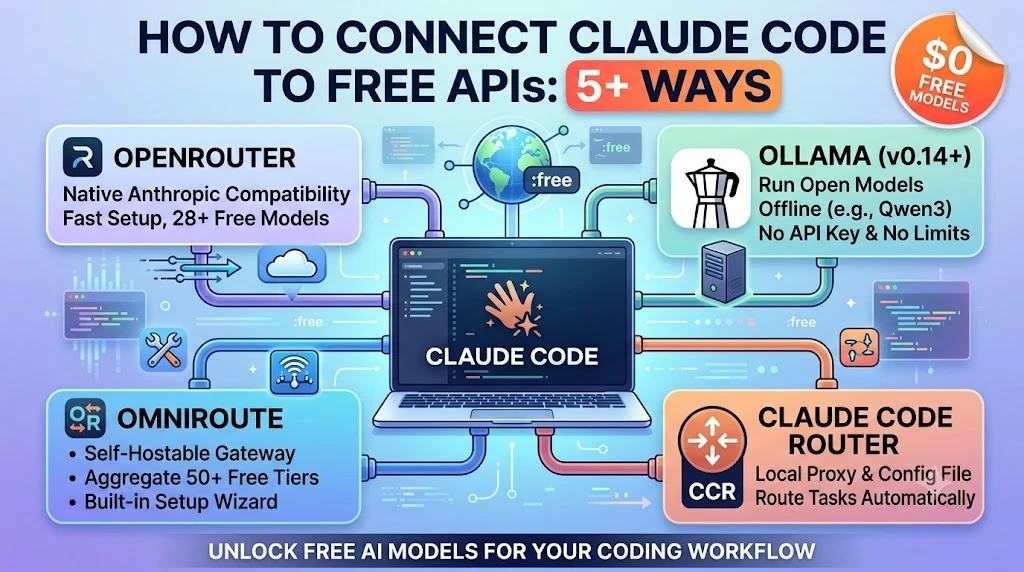
Claude Code normally talks to Anthropic’s own API, but it will happily talk to almost anything else if you point two environment variables — ANTHROPIC_BASE_URL and ANTHROPIC_AUTH_TOKEN — at a different, Anthropic-compatible endpoint instead. That single trick is what makes every method below possible, whether you’re routing through a free gateway like OpenRouter or OmniRoute, running models entirely offline with Ollama, or hitting a provider’s free tier directly.
Key Takeaways
- Claude Code doesn’t have to use Anthropic’s API — setting
ANTHROPIC_BASE_URLandANTHROPIC_AUTH_TOKENredirects it to any Anthropic-compatible endpoint. - OpenRouter is the fastest way in: it speaks Anthropic’s API natively and currently lists 28+ free “:free” models, though requests are capped (50/day without credits, 1,000/day once you’ve spent $10 lifetime).
- OmniRoute is a free, self-hostable gateway that aggregates 290+ providers and roughly 50 free tiers behind one local endpoint, with a setup wizard built specifically for Claude Code.
- Ollama now speaks the Anthropic Messages API directly (v0.14+), so you can run open models like gpt-oss or Qwen3-Coder completely offline with no API key and no rate limit.
- Claude Code Router (CCR) is the power-user option — a local proxy with its own config file that can route different tasks to different providers automatically.
Before You Start: What You Actually Need
Every method here relies on the same two environment variables. ANTHROPIC_BASE_URL tells Claude Code where to send requests instead of Anthropic’s servers, and ANTHROPIC_AUTH_TOKEN (or, for some setups, ANTHROPIC_API_KEY) supplies the credential that endpoint expects. Set both, restart Claude Code, and check the connection with the built-in /status command. If you were previously logged into Claude Code with an Anthropic account, run /logout first so it doesn’t try to use that session instead. For background on what Claude Code actually is before you start rewiring it, our full breakdown of the tool is a good primer.
Learn more about Claude Code, what is claude code? – You might like this >
Way 1: OpenRouter — The Fastest, Most Direct Route
OpenRouter is a single API that sits in front of dozens of AI labs, and it happens to speak Anthropic’s API format natively, so it’s the least fiddly option on this list.
- Create a free account at openrouter.ai and grab a key from openrouter.ai/settings/keys.
- Set three environment variables:
ANTHROPIC_BASE_URLtohttps://openrouter.ai/api,ANTHROPIC_AUTH_TOKENto your OpenRouter key, andANTHROPIC_API_KEYto an empty string so it doesn’t conflict with the token above. - Restart Claude Code and confirm the connection with
/status.
For free usage, look for models with a “:free” suffix on openrouter.ai/models — examples currently include deepseek/deepseek-r1:free for reasoning, qwen/qwen-coder-480b:free for coding specifically, and google/gemini-flash:free for a large context window. The catch: free-tier accounts get 50 requests a day, rising to 1,000 a day once you’ve put at least $10 of lifetime credit on the account (you don’t have to spend it on the free models — just having it there raises the ceiling). The exact free model lineup shifts month to month as providers rotate what they offer, so it’s worth rechecking OpenRouter’s official Claude Code setup guide periodically.
Way 2: OmniRoute — The Free Self-Hosted Gateway
If OpenRouter is the simple option, OmniRoute is the maximalist one: an open-source AI gateway you run yourself that aggregates over 290 providers, including an estimated 50-plus with free tiers, behind a single local endpoint.
- Install and launch it with
npm install -g omniroute, then runomniroute. A dashboard opens athttp://localhost:20128. - Generate an API key from the dashboard’s Endpoints section.
- Point Claude Code at it: base URL
http://localhost:20128/v1, API key from the dashboard, and model set toautofor automatic routing (or pick a specific model combination yourself).
OmniRoute ships setup wizards for several coding tools, Claude Code included, which makes the configuration step mostly automatic. Its free-tier roster spans providers like Pollinations, Cloudflare AI, NVIDIA NIM, Cerebras, and Cohere, and it automatically fails over to the next model in line when one provider’s quota runs dry — useful if you’re stacking several free tiers to avoid hitting any single limit.
Way 3: Claude Code Router (CCR) — The Power-User’s Control Panel
Claude Code Router is a purpose-built local proxy for Claude Code that lets you route different kinds of requests — a quick background task versus a long, complex one — to different models and providers automatically, based on rules you set.
- Install Claude Code itself, then the router:
npm install -g @musistudio/claude-code-router. - Create a config file at
~/.claude-code-router/config.jsonlisting your providers (OpenRouter, DeepSeek, Ollama, Gemini, and others are supported out of the box), each with its own API base URL, key, and model list. - Define routing rules in the config’s Router section — for example, sending “default” requests to one model and “background” or “longContext” requests to another.
- Launch it with
ccr codeto start Claude Code through the router, orccr uito configure everything through a web interface instead of hand-editing JSON.
Because CCR is provider-agnostic, it works well as a wrapper around any of the other methods here — you could, for instance, configure it to fall back to Ollama locally whenever your OpenRouter free quota runs out for the day.
Way 4: Ollama — 100% Free, 100% Local
Since version 0.14, Ollama supports the Anthropic Messages API directly, which means Claude Code can talk to it without any translation proxy in between — and because the models run on your own machine, there’s no API key, no rate limit, and no bill, ever.
- Install Ollama and pull a coding-capable model with at least 32K tokens of context —
gpt-oss:20bandqwen3-coderare both solid choices. - Set
ANTHROPIC_AUTH_TOKENtoollama(it isn’t checked, just required to be present) andANTHROPIC_BASE_URLtohttp://localhost:11434. - Launch Claude Code pointed at your model:
claude --model gpt-oss:20b.
The tradeoff is hardware: local models need real RAM and, ideally, a GPU to run at a usable speed, and they generally lag behind hosted frontier models on the hardest coding tasks. If your machine can’t handle a large local model, Ollama also offers cloud-hosted versions of some models (tagged “:cloud”, like glm-4.7:cloud) that run on Ollama’s servers instead of yours, through the same setup. If you want to go deeper on running models locally beyond just this one use case, we’ve covered how to run local AI models on laptops and phones in more detail.
Way 5: Direct Free-Tier Provider APIs
A handful of AI labs now expose an Anthropic-compatible endpoint directly, meaning you can skip a gateway entirely and set ANTHROPIC_BASE_URL straight to their API. Moonshot AI’s Kimi models are the clearest free example: point ANTHROPIC_BASE_URL to https://api.moonshot.ai/anthropic, add an API key from Moonshot’s platform, and you get a limited but genuinely free tier with no gateway in the middle. Other labs, including Zhipu (GLM) and DeepSeek, expose similar Anthropic-compatible endpoints, though as of this writing their free allowances tend to be trial credits rather than an ongoing free tier — worth checking current terms before you build a workflow around one.
Other Ways to Get Claude Code Running for Free
A few more options are worth knowing about, even if they didn’t make the core five. SiliconFlow offers an Anthropic-compatible endpoint with competitive pricing, though not a standing free tier. Cloud trial credits are another route — Amazon Bedrock and Google Vertex AI both periodically offer free trial credit for new accounts, and both can be wired into Claude Code through Claude Code Router. And if you’re already inside GitHub’s ecosystem, GitHub Models gives free, rate-limited access to a rotating set of hosted models that some community proxies bridge into Claude Code’s expected format, though this route involves more manual setup than the others here. For a broader look at the open-source tooling ecosystem around agents like this one, our guide to open source AI agent frameworks on GitHub covers related ground.
Which Option Should You Actually Use?
| Method | Setup effort | Cost | Best for |
|---|---|---|---|
| OpenRouter | Very low (3 env vars) | Free tier, rate-limited | Getting started in minutes |
| OmniRoute | Low (one install command) | Free, stacks multiple providers | Maximizing free usage |
| Claude Code Router | Medium (config file) | Depends on providers used | Fine-grained control per task |
| Ollama | Medium (local install + model download) | Free, unlimited, needs decent hardware | Offline use, no rate limits |
| Direct provider APIs | Low, but per-provider | Limited free tiers or trial credit | One specific model you already prefer |
If you just want something working in the next five minutes, start with OpenRouter — the setup is three environment variables and there’s no software to install. If you want to squeeze the most free usage out of the fewest limits, OmniRoute’s provider-stacking approach is built for exactly that. If your laptop can handle it and you’d rather never think about rate limits or API keys again, Ollama is the only option here with a genuinely unlimited free tier. And if you’re the type who wants fine-grained control over which model handles which kind of task, Claude Code Router turns all of the above into one configurable system instead of a single choice.
Frequently Asked Questions
Is it actually free to use Claude Code without an Anthropic subscription?
Yes, with caveats. Routing Claude Code through OpenRouter’s free models, a self-hosted gateway like OmniRoute, or local models via Ollama all work without an Anthropic subscription, but free providers typically cap you with daily request limits, slower response times, or less capable models than Anthropic’s own.
Do I need to modify Claude Code itself to use a different API?
No. Claude Code reads two environment variables, ANTHROPIC_BASE_URL and ANTHROPIC_AUTH_TOKEN, to decide where to send requests. Setting those redirects it to a different provider without any code changes or special installation.
Which free option gives the best coding performance?
It varies, but OpenRouter’s qwen/qwen-coder-480b:free and Ollama’s qwen3-coder (run locally) are generally considered the strongest free options for coding-specific tasks as of mid-2026, though neither fully matches Anthropic’s own Claude models on the hardest problems.
Can I combine multiple free providers to avoid hitting any single rate limit?
Yes. That’s exactly what tools like OmniRoute and Claude Code Router are built for. Both can automatically fail over to a different provider once one free tier is exhausted, so you’re not stuck waiting for a daily quota to reset.



1 Comment