
 Madan Chauhan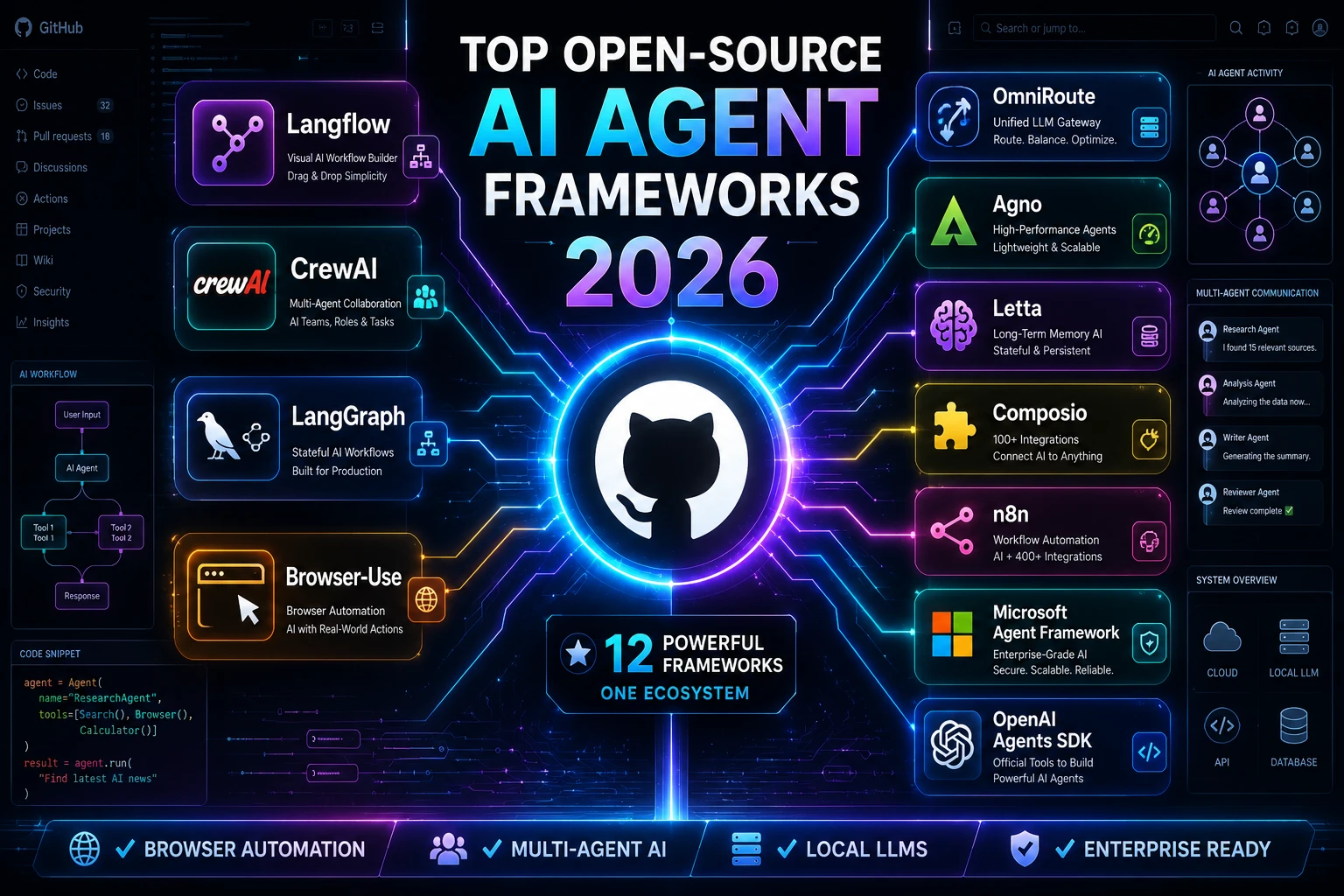
Just a few years ago, AI applications mostly revolved around chatbots that answered questions. Fast forward to 2026, and AI has evolved dramatically. Today’s AI systems can browse websites, write and execute code, analyze documents, coordinate with other AI agents, and even complete complex business workflows with minimal human intervention.
These intelligent systems are known as AI agents.
Unlike traditional chatbots, AI agents don’t stop after generating a response. They reason, plan, use tools, remember previous interactions, and take actions to achieve a goal.
Imagine telling an AI:
“Research the top 20 competitors in cybersecurity, summarize their pricing, prepare an Excel sheet, and email it to my team.”
Instead of giving you a paragraph, an AI agent can actually perform each step automatically.
That’s exactly why AI agent frameworks have become one of the fastest-growing categories on GitHub. According to the source material, developers increasingly evaluate projects by GitHub activity—such as stars, forks, commit frequency, and issue resolution—because these indicators often reflect active maintenance and real-world adoption.
Why Open Source AI Agent Frameworks Are Winning
Companies are increasingly choosing open-source solutions over proprietary AI platforms for several reasons.
With open-source software, you own your infrastructure. Your models, workflows, and sensitive data stay under your control.
Example
A hospital building an AI assistant for patient records cannot send confidential medical information to random cloud APIs.
Instead, they can run everything locally using open-source frameworks.
Many commercial AI platforms force businesses into one ecosystem.
Open-source frameworks let developers switch between OpenAI, Anthropic, Gemini, Ollama, DeepSeek, Mistral, or hundreds of other models without rebuilding everything.
Imagine building your application today using GPT-5, then switching to an open-source model next year because it becomes cheaper.
That’s possible with the right framework.
Running thousands of AI requests every day becomes expensive.
Open-source projects often support:
- Local LLMs
- Free models
- Multiple AI providers
- Smart routing
- Load balancing
This flexibility can significantly reduce operational costs for startups and enterprises.
What Exactly Is an AI Agent Framework?
Think of an AI model as the brain.
An AI agent framework is the body that gives that brain capabilities.
Instead of simply answering prompts, it can:
✔ Remember previous conversations
✔ Search the web
✔ Open browsers
✔ Use APIs
✔ Read PDFs
✔ Execute code
✔ Work with databases
✔ Call external tools
✔ Collaborate with other AI agents
Without an agent framework, an LLM is just a conversational model.
With one, it becomes an autonomous software system capable of solving multi-step tasks.
Real-World Example
Suppose you ask:
“Find every AI news article published today, summarize each one, create a PowerPoint presentation, and email it to me.”
A chatbot might only summarize.
An AI agent built with an agent framework could:
- Search Google
- Visit websites
- Extract information
- Remove duplicate stories
- Generate summaries
- Create slides
- Save a PPT
- Email it automatically
That’s the power of modern AI agents.
How We Evaluated These Frameworks
Choosing an AI framework isn’t just about GitHub stars.
The source material recommends evaluating factors such as documentation, licensing, multi-agent support, memory, browser capabilities, local deployment, workflow automation, and production readiness.
For this guide, each framework is considered against these practical criteria:
| Criteria | Why It Matters |
|---|---|
| Ease of Learning | Beginners need quick onboarding |
| Documentation | Better docs reduce development time |
| Community Size | Large communities solve problems faster |
| Browser Automation | Essential for web agents |
| Multi-Agent Support | Required for collaborative AI systems |
| Memory | Long-term conversations and workflows |
| Local Deployment | Better privacy and lower costs |
| Production Readiness | Suitable for enterprise deployment |
| GitHub Activity | Indicates ongoing maintenance and adoption |
Quick Recommendations
If you’re in a hurry, here’s where to start based on the source’s recommendations.
| Goal | Recommended Framework |
|---|---|
| Beginners | Langflow |
| Browser Automation | Browser-Use |
| Enterprise | Microsoft Agent Framework |
| Production Systems | LangGraph |
| Multi-Agent Teams | CrewAI |
| Local AI | OmniRoute + Agno |
| Workflow Automation | n8n |
1. OmniRoute
Best For
Developers who want one gateway to connect multiple AI models—including local or free options—with coding assistants and agent tools.
Unlike traditional agent frameworks, OmniRoute acts as infrastructure. It routes requests across many LLM providers through a single OpenAI-compatible endpoint. The source notes it is best paired with an actual agent framework rather than used alone.
Why Developers Love It
Imagine your development team uses:
- Cursor
- Claude Code
- GitHub Copilot
- Local Ollama models
- Gemini
- GPT-5
Instead of configuring each tool separately, OmniRoute lets them communicate through one interface.
Real Example
A software company might configure:
- GPT-5 for reasoning
- DeepSeek for coding
- Local Llama models for confidential data
- Gemini for long-context analysis
OmniRoute automatically routes requests to the most appropriate model, reducing cost and improving flexibility.
Pros
- Supports many LLM providers
- Works with local AI models
- Reduces API costs
- Load balancing
- Retry and fallback mechanisms
Cons
- Not a complete agent framework
- Requires another framework such as LangGraph or CrewAI to build full agent logic
Best For:
✅ AI developers
✅ Coding assistants
✅ Local AI enthusiasts
2. Langflow
Best Visual AI Agent Builder
If ChatGPT and Figma had a child, it would probably look like Langflow.
Instead of writing hundreds of lines of Python, you build AI workflows by dragging and connecting components on a visual canvas. According to the source, Langflow has become one of the most popular open-source agent tools, with a large GitHub community and built-in support for APIs, RAG, and MCP-compatible workflows.
Example
Suppose you want an AI that:
- Reads Gmail
- Summarizes emails
- Saves important tasks to Notion
- Sends Slack notifications
Instead of coding every step manually, you connect blocks visually.
Each block performs one task.
Together they become an intelligent workflow.
Advantages
✔ Drag-and-drop builder
✔ Multi-agent workflows
✔ Beginner friendly
✔ Large community
✔ Excellent documentation
Drawback
Complex enterprise workflows may still require lower-level, code-first frameworks for maximum control.
3. Browser-Use
The Framework That Gives AI Eyes
Most LLMs can’t actually interact with websites.
Browser-Use changes that.
It allows AI agents to:
- Click buttons
- Fill forms
- Scroll pages
- Read content
- Navigate websites
The source describes Browser-Use as a Python library that maps website structure into a format LLMs can understand, enabling natural-language browser interactions.
Example:
Imagine building an AI travel assistant.
You ask:
“Book the cheapest flight from Delhi to Singapore next Friday.”
A Browser-Use-powered agent can:
- Visit airline websites.
- Compare prices.
- Select filters.
- Fill passenger details.
- Complete the booking process (subject to your approvals and site constraints).
Other Practical Uses
- Automated software testing
- Competitor price monitoring
- Lead generation
- Web research
- Data collection
- Form automation
Pros:
- Uses Playwright under the hood
- Supports multiple LLMs
- Compatible with local models
- Strong ecosystem
Cons:
Web automation can still fail on websites with aggressive bot protection or complex anti-automation measures.
4. LangGraph
Best for Production-Grade AI Agents
While Langflow focuses on visual development, LangGraph is built for developers who want complete control over how AI agents think, remember, and make decisions.
Instead of dragging blocks together, LangGraph lets you build agents as graphs, where every node represents a decision, action, or AI call. According to the source, LangGraph is designed for resilient, stateful, long-running agents and provides fine-grained control over branching logic and agent state.
Think of it like Google Maps.
Every road is a possible decision.
The AI can choose different routes depending on what happens next.
Real-World Example
Imagine you’re building an AI Insurance Claim Assistant.
A customer uploads photos of a damaged car.
Instead of immediately approving the claim, the AI follows a decision graph:
Upload Images
      │
      ▼
Detect Vehicle Damage
      │
      ▼
Estimate Repair Cost
      │
      ├───────────────┐
      │               │
Less than $2,000   More than $2,000
      │               │
Auto Approval     Human Review
      │               │
      ▼               ▼
Notify Customer   Send to Claims Officer
Unlike a chatbot, LangGraph remembers exactly where every claim is in the workflow.
Why Developers Choose LangGraph
Large organizations often need:
- Human approval checkpoints
- Long-running workflows
- Error recovery
- Persistent state
- Multiple AI agents working together
LangGraph is built specifically for these scenarios.
Key Features
✔ Graph-based workflows
✔ Persistent memory
✔ Human-in-the-loop approvals
✔ Streaming responses
✔ State management
✔ LangSmith observability integration
Advantages
- Extremely flexible
- Production-ready
- Excellent for enterprise systems
- Handles complex decision trees
- Strong integration with the LangChain ecosystem
Limitations
Because it offers so much control, LangGraph has a steeper learning curve than visual tools like Langflow.
Beginners may find it overwhelming.
Best For
✅ SaaS products
✅ Enterprise AI
✅ Banking
✅ Healthcare
✅ Long-running AI workflows
5. CrewAI
The Framework That Lets AI Work as a Team
Most AI applications rely on a single model doing everything.
CrewAI takes a different approach.
Instead of one AI handling every task, you assign different roles to specialized agents that collaborate—similar to a human team. The source highlights CrewAI’s role-based abstraction and support for sequential or hierarchical collaboration.
Think about how a newspaper works.
You don’t have one employee writing, editing, designing, and publishing everything.
Instead, each person specializes.
CrewAI applies the same concept to AI.
Example:
Imagine creating an AI Marketing Department.
You assign different responsibilities:
Research Agent
- Finds trending topics
- Collects statistics
- Identifies competitors
↓
SEO Expert
- Finds keywords
- Creates outlines
- Optimizes headings
↓
Writer
- Produces the first draft
↓
Editor
- Improves readability
- Checks grammar
↓
Publisher
- Uploads the article
- Creates metadata
Five AI agents.
One finished article.
Practical Business Use Cases
HR
One agent screens resumes.
Another schedules interviews.
A third sends offer letters.
Sales
One agent finds leads.
Another qualifies them.
Another prepares proposals.
Customer Support
Different agents handle:
- Billing
- Technical issues
- Product information
without one AI becoming overloaded.
Advantages
✔ Easy to understand
✔ Excellent documentation
✔ Multi-agent collaboration
✔ Clear role assignments
✔ Rapid development
Limitations
If your workflow involves very complex branching logic, LangGraph may provide more granular control.
Best For
✅ Research teams
✅ Marketing agencies
✅ AI automation
✅ Business operations
6. OpenAI Agents SDK
Best for OpenAI Developers
If your entire application already relies on OpenAI models, the OpenAI Agents SDK provides a lightweight, code-first way to build agent workflows. The source describes it as supporting agent handoffs, guardrails, tracing, and tool calling.
Example
Suppose you’re building an AI travel assistant.
One specialized agent handles:
✈ Flight booking
Another handles:
🏨 Hotels
Another handles:
🚗 Car rentals
The SDK lets these agents hand work to one another as the user’s request changes.
Why It’s Popular
Developers don’t have to build every orchestration feature from scratch.
The SDK already includes:
- Tool calling
- Tracing
- Agent handoffs
- Guardrails
Pros
- Simple API
- Strong OpenAI integration
- Lightweight
- Good developer experience
Cons
If you frequently switch between AI providers, more model-agnostic frameworks may offer greater flexibility.
Best For
✅ OpenAI-based applications
✅ Startups
✅ AI assistants
7. Microsoft Agent Framework
Enterprise AI at Scale
Microsoft has consolidated much of its AI agent work into the Microsoft Agent Framework, which the source describes as the successor path after moving AutoGen into maintenance mode. It supports enterprise-grade, multi-language agent workflows across .NET and Python.
This framework is designed for organizations that already rely on:
- Azure
- Microsoft 365
- .NET
- Enterprise infrastructure
Example
Imagine a multinational bank.
Thousands of employees interact with internal systems every day.
The bank builds:
- Loan agents
- Compliance agents
- Fraud detection agents
- Customer service agents
Each AI agent communicates securely with enterprise databases.
Enterprise Features
✔ Multi-language support
✔ Enterprise security
✔ Production deployment
✔ Large workflow orchestration
✔ Microsoft ecosystem integration
Best For
✅ Large enterprises
✅ Government organizations
✅ Banking
✅ Insurance
8. AutoGen
A Pioneer in Multi-Agent Collaboration
Before Microsoft shifted its investment toward the Microsoft Agent Framework, AutoGen was one of the most influential multi-agent projects. The source notes that it has entered maintenance mode, meaning existing deployments remain relevant but new projects should generally consider the newer framework.
Example
A software development workflow could include:
Developer Agent
↓
Tester Agent
↓
Debugger Agent
↓
Reviewer Agent
↓
Documentation Agent
Each agent contributes to a different phase of the software lifecycle.
Why People Still Use It
Thousands of tutorials and production systems were built with AutoGen.
If your organization already depends on it, there’s often no need for an immediate migration.
Advantages
✔ Mature ecosystem
✔ Large community
✔ Proven architecture
Drawbacks
Since Microsoft has shifted future development to the Microsoft Agent Framework, new greenfield projects should evaluate that newer option first.
Framework Comparison at a Glance
| Framework | Best For | Difficulty | Enterprise Ready | Multi-Agent | Browser Support |
|---|---|---|---|---|---|
| LangGraph | Complex AI systems | ⭐⭐⭐⭐ | ✅ | ✅ | Via tools |
| CrewAI | Team-based AI | ⭐⭐⭐ | Medium-High | ✅ | Via tools |
| OpenAI Agents SDK | OpenAI apps | ⭐⭐ | Medium | ✅ | Via tools |
| Microsoft Agent Framework | Enterprise | ⭐⭐⭐⭐ | ✅ | ✅ | Via tools |
| AutoGen | Existing deployments | ⭐⭐⭐ | Medium | ✅ | Via tools |
Which One Should You Choose?
If you’re:
- Building your first AI agent: Start with Langflow.
- Creating a production SaaS platform: Choose LangGraph.
- Designing AI teams with specialized roles: Use CrewAI.
- Developing primarily with OpenAI models: Consider the OpenAI Agents SDK.
- Working in a Microsoft enterprise environment: The Microsoft Agent Framework is the strongest fit.
- Maintaining an existing AutoGen project: Continuing with AutoGen may make sense, but evaluate migration plans for future development.
9. Agno
Best Lightweight AI Agent Framework for High-Performance Applications
If LangGraph is like a full enterprise operating system, Agno is more like a high-performance sports car—fast, lightweight, and built for developers who want speed without unnecessary complexity.
According to the source material, Agno (formerly Phidata) is a multi-agent framework, runtime, and control plane designed with a focus on performance, privacy, and scalability. It includes built-in memory, knowledge tools, and support for multi-agent teams.
Unlike larger frameworks that require extensive configuration, Agno emphasizes simplicity while remaining production-capable.
Real-World Example
Imagine you’re building an AI Financial Advisor.
Every user request requires the AI to:
- Retrieve portfolio data
- Analyze stock performance
- Read financial news
- Generate recommendations
- Produce charts
Instead of one massive AI model doing everything, Agno lets you create specialized agents that work together efficiently.
For example:
Client Question
        │
        ▼
Portfolio Agent
        │
        ▼
Market Analysis Agent
        │
        ▼
Risk Assessment Agent
        │
        ▼
Report Generator
Each agent focuses on one responsibility, improving both performance and maintainability.
Why Developers Like Agno
Agno is particularly attractive when building applications that need:
- Low latency
- Privacy
- Self-hosting
- Fast execution
- Minimal overhead
Advantages
✔ Lightweight runtime
✔ Multi-agent support
✔ Built-in memory
✔ Knowledge management
✔ Excellent for local deployment
Limitations
Compared with LangGraph or Langflow, Agno has a smaller ecosystem and fewer community tutorials, which can mean more experimentation for newcomers.
Best For
✅ SaaS products
✅ Local AI deployments
✅ High-performance APIs
✅ Privacy-focused applications
10. Letta
Best AI Framework for Long-Term Memory
One of the biggest weaknesses of many AI systems is memory.
Most models forget what happened after the conversation ends.
Letta is designed to solve that problem.
According to the source, Letta focuses on stateful agents with persistent memory, allowing agents to retain and improve their knowledge over time.
Think of it as giving AI a notebook that it can revisit whenever it needs context.
Real-World Example
Imagine an AI customer support assistant.
Traditional Chatbot
Customer:
“Last month I ordered a laptop.”
AI:
“Sorry, I don’t remember.”
Letta Agent
Customer:
“I’m having the same issue I reported last month.”
AI:
“I remember your Lenovo ThinkPad order and that we replaced the charging adapter. Let’s continue troubleshooting from there.”
That continuity creates a much better user experience.
Additional Use Cases
- Personal AI assistants
- Healthcare follow-up systems
- Education platforms tracking student progress
- AI companions
- Long-term coaching applications
Advantages
✔ Persistent memory
✔ Long-running conversations
✔ Stateful architecture
✔ Self-improving knowledge
Limitations
If your project mainly requires workflow orchestration rather than long-term memory, broader frameworks like LangGraph or CrewAI may be a better fit.
Best For
✅ AI assistants
✅ CRM applications
✅ Customer support
✅ Healthcare
11. Composio
The Bridge Between AI and Real Applications
Most AI frameworks can think.
But can they actually do something?
That’s where Composio comes in.
The source describes Composio as an integration layer that provides 100+ pre-built integrations through function calling and MCP-compatible tooling, helping agents connect with real-world software.
Instead of writing custom integrations for every service, developers can connect their agents to many applications much more quickly.
Real-World Example
Suppose you’re building an AI sales assistant.
The agent needs to:
- Read Gmail
- Check HubSpot
- Create a Notion page
- Update Salesforce
- Send Slack messages
Without Composio, you’d need to integrate each service manually.
With Composio, many of those integrations are already available.
Business Example
A recruiter asks:
“Schedule interviews for the top five candidates.”
The AI could:
- Read resumes
- Check Google Calendar
- Find available meeting slots
- Send Outlook invitations
- Update the ATS
- Notify the hiring manager
Composio provides the connections that allow those actions.
Advantages
✔ Large integration library
✔ Function calling
✔ MCP compatibility
✔ Saves development time
Limitations
Composio is not a complete AI agent framework. It works best alongside frameworks such as LangGraph, CrewAI, or Agno.
Best For
✅ Enterprise automation
✅ SaaS integrations
✅ CRM workflows
✅ Productivity tools
12. n8n
Best Visual Workflow Automation Platform
Although n8n began as a workflow automation platform, it now includes strong AI agent capabilities.
The source positions it as the largest “agent-adjacent” project in the comparison and notes its visual workflow builder, extensive integrations, AI agent nodes, and self-hosting options.
Unlike frameworks aimed primarily at developers, n8n allows business users and operations teams to automate processes with minimal coding.
Example
Imagine running an online store.
Every time a customer places an order:
New Order

↓

AI checks inventory

↓

AI creates invoice

↓

AI emails customer

↓

AI updates CRM

↓

AI notifies warehouse

↓

AI sends shipping confirmation
Instead of manually coordinating these steps, n8n orchestrates the entire workflow.
More Business Use Cases
HR
- Employee onboarding
- Leave approvals
- Payroll notifications
Marketing
- Publish blogs
- Generate social posts
- Send newsletters
- Track analytics
Finance
- Invoice processing
- Expense approvals
- Payment reminders
Customer Support
- Ticket routing
- Auto responses
- Escalation workflows
Advantages
✔ Visual builder
✔ 400+ integrations
✔ AI nodes
✔ Self-hosted
✔ Excellent community
Limitations
n8n is a workflow automation platform with AI features rather than a dedicated AI agent framework. If your primary goal is sophisticated reasoning and agent orchestration, you may pair it with another framework.
Complete Comparison Table
| Framework | Best For | Difficulty | Browser Automation | Multi-Agent | Memory | Visual Builder | Local Deployment |
|---|---|---|---|---|---|---|---|
| OmniRoute | Model routing | ⭐⭐ | ❌ | N/A | ❌ | ❌ | ✅ |
| Langflow | Beginners | ⭐⭐ | Via plugins | ✅ | ✅ | ✅ | ✅ |
| Browser-Use | Browser automation | ⭐⭐⭐ | ✅ | Limited | Limited | ❌ | ✅ |
| LangGraph | Enterprise AI | ⭐⭐⭐⭐ | Via tools | ✅ | ✅ | ❌ | ✅ |
| CrewAI | AI teams | ⭐⭐⭐ | Via tools | ✅ | ✅ | ❌ | ✅ |
| OpenAI Agents SDK | OpenAI ecosystem | ⭐⭐ | Via tools | ✅ | ✅ | ❌ | Limited |
| Microsoft Agent Framework | Enterprise | ⭐⭐⭐⭐ | Via tools | ✅ | ✅ | ❌ | ✅ |
| AutoGen | Existing deployments | ⭐⭐⭐ | Via tools | ✅ | ✅ | ❌ | ✅ |
| Agno | Performance | ⭐⭐⭐ | Via tools | ✅ | ✅ | ❌ | ✅ |
| Letta | Long-term memory | ⭐⭐⭐ | ❌ | Limited | ⭐⭐⭐⭐⭐ | ❌ | ✅ |
| Composio | Tool integrations | ⭐⭐ | Limited | N/A | ❌ | ❌ | ✅ |
| n8n | Workflow automation | ⭐⭐ | Via nodes | Limited | Limited | ✅ | ✅ |
Which Framework Should You Choose?
Choosing the “best” framework depends on your project rather than a single winner. The source itself recommends different frameworks for different scenarios.
You’re a Beginner
👉 Choose Langflow
You’ll learn AI workflows visually before diving into code.
You Want Enterprise Reliability
👉 Choose LangGraph
It offers state management, workflow control, and production-oriented architecture.
You Need AI Teams
👉 Choose CrewAI
Different AI agents can specialize and collaborate efficiently.
You Need Browser Automation
👉 Choose Browser-Use
Ideal for web research, testing, scraping, and browser interaction.
You Want Long-Term Memory
👉 Choose Letta
Designed specifically for remembering users and maintaining context over long periods.
You Need Lots of Integrations
👉 Choose Composio
Connects agents with external services using pre-built integrations.
You Want Business Automation
👉 Choose n8n
Excellent for connecting AI with existing business workflows.
You Want Local AI
👉 Pair OmniRoute with Agno or Letta
The source recommends OmniRoute for routing local or free models and pairing it with an agent runtime for full functionality.
Common Beginner Mistakes
Many developers rush into building AI agents without first defining the problem they’re solving. Common pitfalls include:
1. Choosing by GitHub Stars Alone
Popularity doesn’t always match your requirements. A smaller framework may be a better fit for your workload.
2. Ignoring Deployment Needs
If your application handles sensitive data, verify that the framework supports local or self-hosted deployment.
3. Expecting One Framework to Do Everything
Some projects focus on orchestration, others on memory, browser automation, or integrations. Combining complementary tools is often the best approach.
4. Skipping Workflow Design
Map out your agent’s decision process before writing code. A clear workflow usually leads to more reliable automation.
GitHub Trends Shaping AI Agents in 2026
Based on the uploaded research, several trends are influencing the ecosystem.
- Open-source AI agents continue to grow rapidly.
- Browser-native automation is becoming increasingly important.
- Multi-agent architectures are replacing single-agent designs for complex tasks.
- MCP (Model Context Protocol) adoption is improving interoperability between tools.
- AI gateways such as OmniRoute are helping reduce dependence on a single model provider.
- Enterprise adoption is increasing as frameworks mature.
Final Verdict
Open-source AI agent frameworks have evolved far beyond simple chatbot libraries. They now power research assistants, browser automation, coding copilots, customer support systems, workflow automation, and enterprise applications.
For most developers:
🥇 Best Overall: Langflow
🥈 Best Enterprise: LangGraph
🥉 Best Browser Automation: Browser-Use
🏅 Best Multi-Agent Collaboration: CrewAI
🏅 Best Long-Term Memory: Letta
🏅 Best Workflow Automation: n8n
🏅 Best Local AI Infrastructure: OmniRoute
No single framework is perfect for every use case. The right choice depends on your team’s expertise, deployment requirements, privacy needs, and the complexity of the workflows you plan to build.
Frequently Asked Questions
What is an AI agent framework?
An AI agent framework is a software toolkit that enables AI systems to reason, use tools, maintain context, and complete multi-step tasks instead of responding to a single prompt.
Which AI agent framework is easiest for beginners?
Based on the source material, Langflow is one of the easiest starting points because of its visual drag-and-drop interface and extensive community support.
Can I run AI agents locally?
Yes. The source notes that several frameworks support local deployment, and OmniRoute can be used to route requests to local or free-tier models when paired with an agent runtime.
Which framework is best for browser automation?
Browser-Use is purpose-built for browser interaction and web automation, making it a strong choice for tasks such as testing, research, and form automation.
Is Composio an AI agent framework?
Not by itself. According to the source, Composio is primarily an integration layer that helps AI agents connect with external tools and APIs.
Which framework should enterprises consider?
The source highlights LangGraph for production-grade orchestration and Microsoft Agent Framework for organizations invested in the Microsoft ecosystem.
