
 Madan Chauhan
Watching live TV without expensive cable subscriptions is no longer a dream. With the right setup, VLC Media Player can turn your desktop or mobile device into a powerful free TV hub. This complete, step-by-step guide explains how to watch any TV channel for free on Desktop and Mobile using VLC Player, safely, legally, and efficiently.
Why VLC Player Is the Best Tool for Free TV Streaming
VLC is developed by VideoLAN, a globally trusted open-source organization. VLC is:
- 100% free & open-source
- Available on Windows, macOS, Linux, Android & iOS
- No ads, no spyware, no tracking
- Supports IPTV, M3U playlists, and network streams
- Extremely lightweight and secure
Unlike shady streaming apps, VLC does not host illegal content. You simply tell it where to play publicly available TV streams.
Understanding How Free TV Works on VLC (Important)
Before setup, you must understand what VLC actually does.
VLC does NOT hack TV channels.
It plays publicly available IPTV streams shared by broadcasters, governments, or legal platforms.
Legal Sources Include:
- Free-to-air TV channels
- Government broadcast streams
- International public networks
- Educational & news channels
- Open IPTV playlists
⚠️ Always respect your local laws. This guide focuses on legal and publicly available streams.
What Is IPTV and Why VLC Supports It
IPTV (Internet Protocol Television) means TV delivered via internet instead of cable or satellite.
IPTV Uses:
- M3U playlist files
- Stream URLs
- Network streams
VLC natively supports all of these formats, making it one of the most powerful IPTV players available.
How to Download VLC Player (Desktop & Mobile)
Desktop (Windows, macOS, Linux)
- Download from the official VideoLAN website
- Avoid third-party installers
Mobile Devices
- Android: Google Play Store → VLC for Android
- iOS/iPhone: App Store → VLC for Mobile
✅ VLC mobile apps are completely free.
How to Watch Free TV Channels on Desktop Using VLC Player

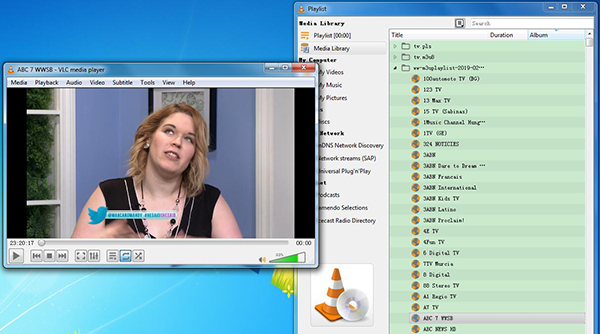

Method 1: Using Network Stream URL (Easiest)
- Open VLC Media Player
- Click Media → Open Network Stream
- Paste a public IPTV stream URL (https://iptv-org.github.io/iptv/index.m3u)
- Click Play
📺 The TV channel starts instantly.
Method 2: Using M3U Playlist File (Best Experience)
An M3U playlist contains hundreds or thousands of channels.
Steps:
- Download a public IPTV M3U playlist
- Open VLC
- Click Media → Open File
- Select the
.m3ufile - Open View → Playlist
- Browse channels by country or category
💡 This method allows channel switching like cable TV.
How to Watch Free TV Channels on Android Using VLC

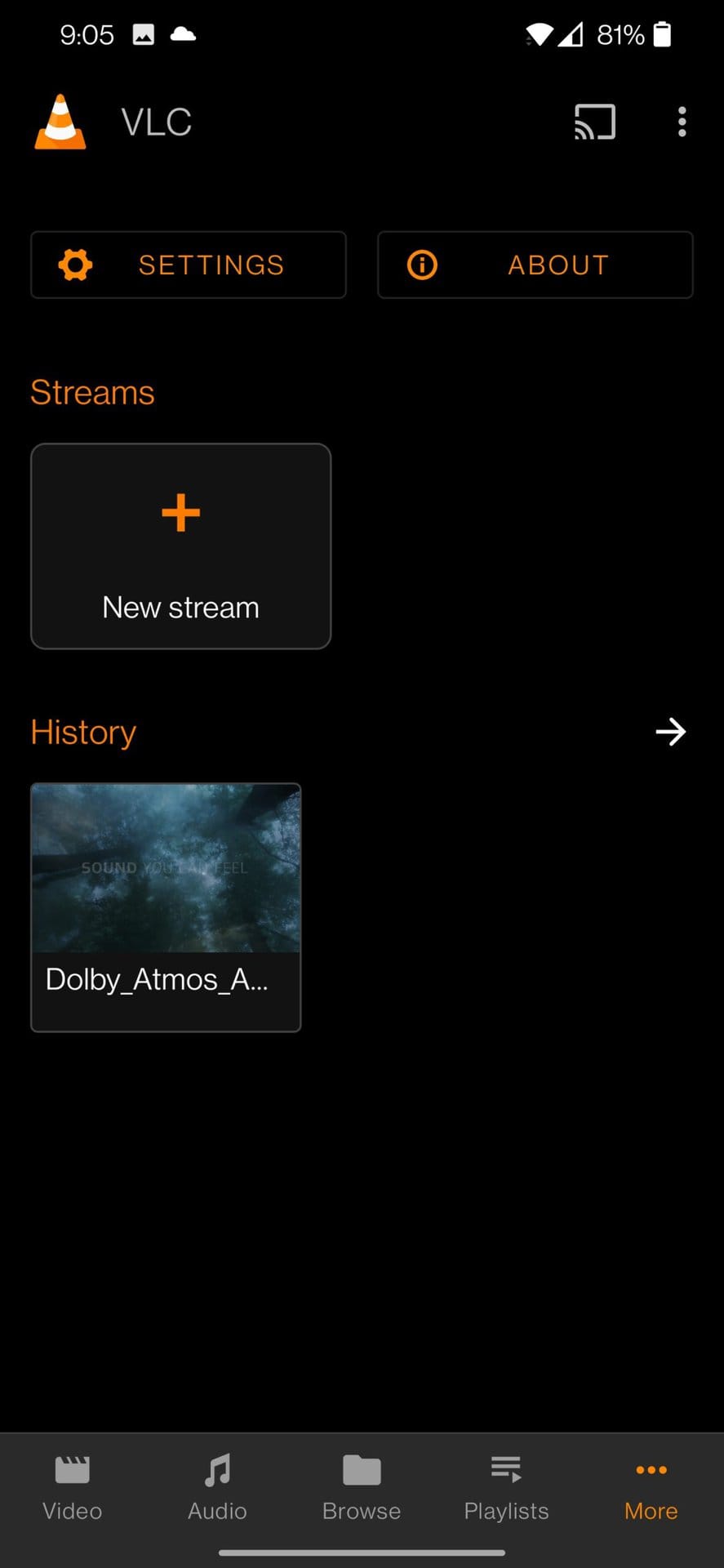

Steps:
- Install VLC for Android
- Open the app
- Tap More → Stream
- Paste IPTV URL OR load M3U file (https://iptv-org.github.io/iptv/index.m3u)
- Tap Play
✔️ Works on phones, tablets, Android TV & Firestick
How to Watch Free TV Channels on iPhone Using VLC

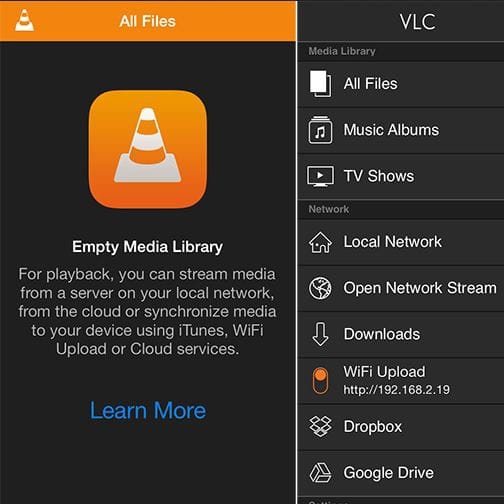
Steps:
- Install VLC for Mobile
- Open app → Network
- Select Open Network Stream
- Paste stream URL
- Tap Play
📌 For M3U files, upload via Files app or iTunes sharing.
Best Types of Free TV Channels You Can Watch on VLC
Using legal IPTV playlists, you can watch:
- 🌍 International TV channels
- 📰 News (global & regional)
- 🎓 Educational channels
- 📺 Public entertainment channels
- 🏟️ Free sports (where legally available)
- 🎵 Music TV
- 🧒 Kids channels
How to Organize Channels Inside VLC (Pro Tip)
On desktop:
- Open Playlist View
- Create folders
- Rename channels
- Sort by country or language
On mobile:
- Favorite channels
- Resume last watched stream
This improves user experience and watch time.
Common Problems & Fixes (Troubleshooting)
❌ Channel Not Playing?
✔️ Stream may be offline
✔️ Try another channel
✔️ Update playlist
❌ Buffering?
✔️ Use faster internet
✔️ Lower video caching (Advanced settings)
❌ No Audio?
✔️ Change audio track
✔️ Update VLC version
Is It Safe to Watch Free TV on VLC?
✅ Yes, VLC is completely safe
But:
- Only use trusted IPTV sources
- Avoid paid “pirate IPTV” services
- Never install cracked apps
Using VLC itself does not violate any law.
VLC vs Other Free TV Apps (Why VLC Wins)
| Feature | VLC | Other Apps |
|---|---|---|
| Ads | ❌ None | ✅ Yes |
| Cost | Free | Often Paid |
| Privacy | High | Low |
| Open Source | Yes | No |
| Device Support | All | Limited |
SEO Summary (Why This Method Is Popular in 2026)
- Cord-cutting trend increasing
- Free IPTV growing worldwide
- VLC trusted by millions
- Works on desktop & mobile
- No login or account required
FAQ – Watch TV Channels for Free Using VLC Player
Q: Is VLC Player legal to use for watching TV?
A: Yes. VLC is legal. Content legality depends on the stream source.
Q: Can I watch live sports for free using VLC?
A: Only if the sports channel is free-to-air or publicly available.
Q: Does VLC work without internet?
A: Live TV requires internet. Offline files do not.
Q: Is VLC better than Kodi?
A: VLC is simpler, lighter, and safer for beginners.
Q: Can I record TV channels in VLC?
A: Yes, VLC supports recording live streams.
1 Comment